
Settings
Project settings that control Config Toolkit Blueprint node behavior.
Open the settings panel from Unreal Editor:
Project Settings > Plugins > Config Toolkit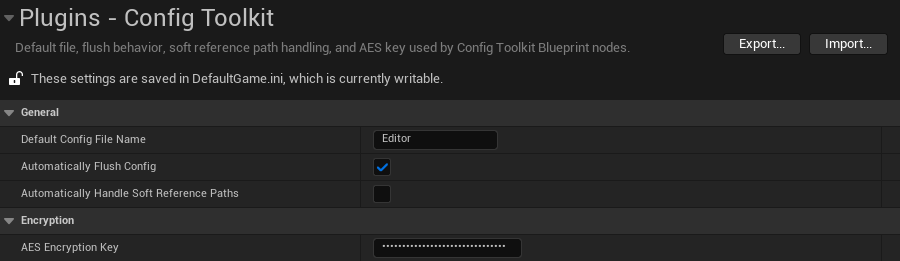
Settings Are Global
These settings control the Blueprint nodes globally for the current Unreal project.
Source-Controlled Defaults
Config Toolkit settings are stored in game config. Teams that want deterministic defaults can add them to Config/DefaultGame.ini:
[/Script/ConfigToolkit.ConfigToolkitSettings]
DefaultConfigFilename=Game
bAutomaticallyFlushConfig=True
bAutomaticallyHandleSoftReferencePaths=True
AESEncryptionKey=
Security Warning
Do not commit a real production encryption key unless that is an intentional project policy. Treat encrypted strings as lightweight local config privacy, not as a secure vault for high-value secrets.
Core Settings
Default Config File Name
The generated config name used when a Blueprint node receives an empty File Name pin.
Automatically Flush Config
Controls whether write/remove/delete-style operations flush the config cache to disk immediately.
Automatically Handle Soft Reference Paths
Lets wildcard pins read and write Soft Object Reference and Soft Class Reference values as paths.
AES Encryption Key
A 32-byte key required only by Write Encrypted String and Read Encrypted String.
Default Config File Name
Default:
GameUsed when a Blueprint node receives an empty File Name pin.
| Setting value | Result |
|---|---|
Editor | Uses Unreal's generated Editor.ini. |
Game | Uses Unreal's generated Game.ini. |
MyConfig | Uses Unreal's generated MyConfig.ini. |
| empty | Reset to Game by the settings object. |
Generated config files commonly appear under:
Saved/Config/WindowsEditor/Packaged Windows builds commonly write under:
Saved/Config/Windows/Automatically Flush Config
Default:
EnabledWhen enabled, operations that change config data flush through Unreal's config system after the change.
Affected nodes:
Write Config ValueWrite Config ArrayAdd Unique To Config ArrayRemove From Config ArrayWrite Encrypted StringClear Config KeyClear Config SectionRemove Config Section
Recommended Default
Keep automatic flush enabled for simple Blueprint usage and debugging. Disable it only when batching many writes, then call Flush Config once at the end.
Automatically Handle Soft Reference Paths
Default:
EnabledWhen enabled, wildcard read/write nodes automatically handle these pin types:
Soft Object ReferenceSoft Class Reference- arrays of
Soft Object Reference - arrays of
Soft Class Reference
- A Soft Object Reference pin is saved as a soft object path string.
- A Soft Class Reference pin is saved as a soft class path string.
- A hard Object Reference or Class Reference pin can also be written because the referenced object/class is already loaded.
- A saved path can be read into a Soft Object Reference pin.
- A saved path can be read into a Soft Class Reference pin.
- Reading into a hard Object Reference or hard Class Reference pin fails by design because that would require synchronous loading.
When disabled, use the explicit conversion nodes instead:
Convert Asset To PathConvert Class To PathConvert Path To AssetConvert Path To Class
AES Encryption Key
Used by:
Write Encrypted StringRead Encrypted String
Requirements:
- Exactly 32 characters.
- Exactly 32 UTF-8 bytes.
12345678901234567890123456789012Only Values Are Encrypted
The config file name, section name, and key name remain readable. Only the value stored by the encrypted string nodes is encrypted. Treat encrypted strings as lightweight local config privacy, not as a secure vault for high-value secrets.
Last updated on