
Plugin Installation
Install Windows Native Toolkit from GitHub or Fab and enable it in Unreal Engine 5.6 through 5.8.
Before You Start
Windows Native Toolkit is a code plugin. Install it in the project that needs the nodes, then restart Unreal Engine after enabling it.
Supported Unreal Versions
| Unreal Engine | Status |
|---|---|
| 5.6 | Supported |
| 5.7 | Supported |
| 5.8 | Supported |
The plugin is Windows-native. Win64 is the primary runtime target. macOS and Linux developers can compile the project because Windows API code is guarded, but native feature nodes return fallback values outside Windows.
Install And Enable
Download The Plugin
https://github.com/AldertLake/Windows-Native-ToolkitPlace The Plugin Folder
Rebuild The Project
Right-click the .uproject file and generate project files if needed, then build the editor target from Visual Studio or Rider.
Add From Fab
https://www.fab.com/listings/db1cb6ed-ac7e-4408-a901-e45d6694cb0bInstall To The Project
In Epic Games Launcher, install the plugin to the target project or engine slot.
Open The Project
Launch the project. Unreal may ask to rebuild modules after the plugin is enabled.
Plugin Settings
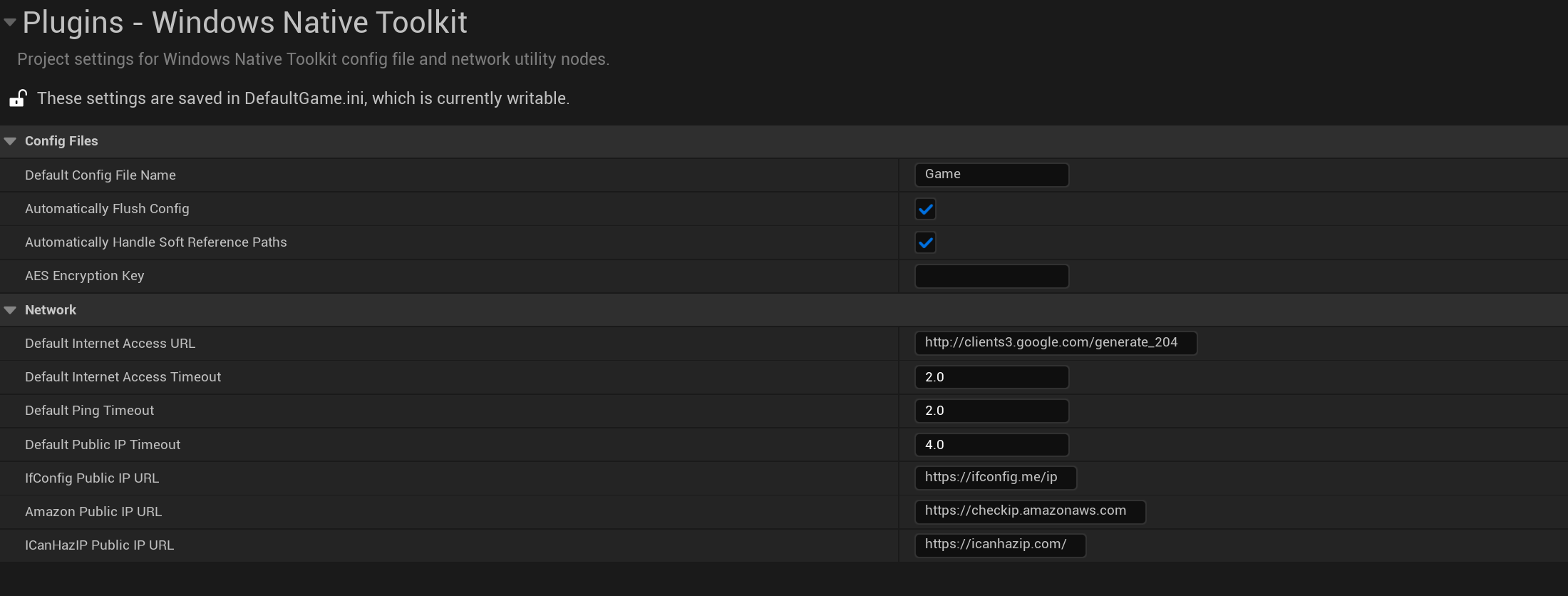
Config Files
These settings govern how the plugin handles configuration files and string encryption.
| Setting | Description | Affected Nodes |
|---|---|---|
| Default Config File Name | The default local .ini file used if no path is provided. | Read Config String, Write Config String, Delete Config File |
| Auto-flush Behavior | When enabled, instantly writes to disk after saving. | All Config Write Nodes |
| AES Encryption Key | 256-bit symmetric key used for encrypting strings locally. | Encrypt String, Decrypt String |
Network
These settings define fallback URLs and timeouts for internet and network diagnostic nodes.
| Setting | Description | Affected Nodes |
|---|---|---|
| Default Internet Test URL | Target URL checked to confirm active internet connection. | Is Connected To Internet |
| Default Request Timeout | Maximum time allowed before a network request fails. | Ping URL or IP, Resolve Domain, FTP Nodes |
| Public IP Provider URLs | List of fallback endpoints to securely query the machine's external IP. | Get Public IP |
Last updated on